One of the first questions businesses ask when planning to implement an HR system software is how long the process will actually take, and it is also one of the few questions that rarely gets a straightforward answer.
Most vendors respond with “it depends,” which is true, but not particularly useful without context. Implementation consultants often provide timelines broad enough to fit almost any outcome, while businesses that have already gone through the process tend to answer based on their own experience, which may look very different from yours.
The reality is fairly simple. A small business with organized employee data, clearly defined requirements, and fast internal decision-making can often be fully live on a new HR system within 3 to 6 weeks. Meanwhile, a larger or more complex organization dealing with inconsistent historical records, unclear workflows, multiple approvals, and shifting priorities may need anywhere from 3 to 6 months before implementation is complete.
Both scenarios are common. In most cases, the biggest factor affecting how long it takes to implement HR system software is not the platform itself, but how prepared the business is before the project begins. Clean data, aligned stakeholders, and clearly documented processes usually make a larger difference than companies initially expect.
In this article, we will break down the different stages involved when businesses implement HR system software, what typically affects implementation timelines, and why some companies consistently complete the process faster and more smoothly than others.
What It Means to Implement an HR System in Practice
Implementation is not the same as buying software. A lot of businesses discover this later than they should.
When you implement an HR system, you are doing several things at once. You are migrating existing employee data into the new system, which requires that data to be clean, complete, and in a format that can be transferred.
You are configuring the system to reflect how your business actually operates: your departments, your leave policies, your pay structures, your approval workflows.
You are training the people who will use it, which means different training for HR administrators, for managers who will handle approvals, and for employees who will use self-service features.
And you are validating that the system produces accurate outputs before you retire the processes it is replacing.
Each of those steps takes time, and the time each takes is determined by how much preparation happened before it started.
This is why the question of how to choose the right HR system matters so much before implementation begins. Getting the selection process right shapes everything that follows.
The piece on What You Need to Know Before You Choose HR Software covers the questions worth working through at that stage.
HR System Implementation Phases
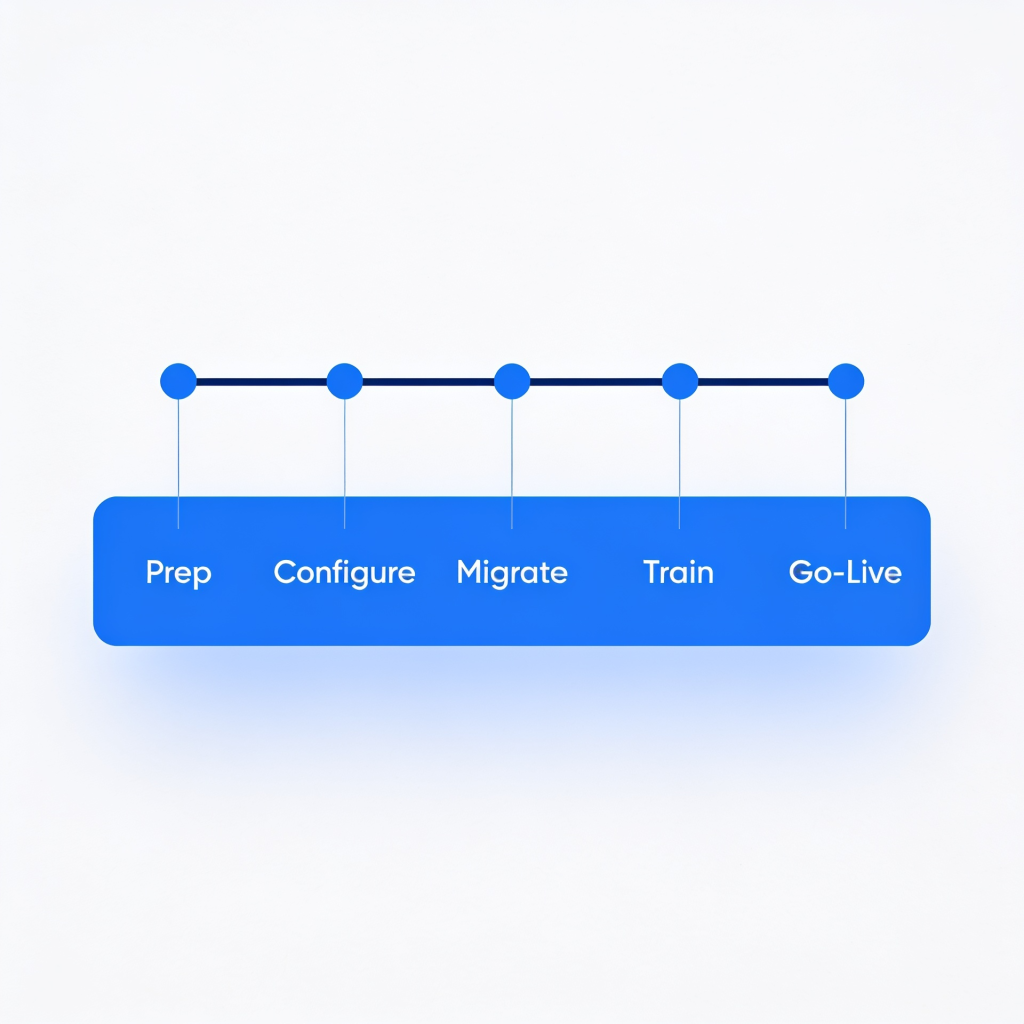
Phase One: Preparation
This phase is consistently underestimated, and it is where most implementation delays originate.
Preparation means gathering the data that needs to go into the system. Employee records, current leave balances, payroll history, social insurance details, and contract terms.
In a business where this information is centralized and well-maintained, pulling it together takes a few days.
In a business where it lives across multiple spreadsheets of varying formats, some paper files, and some information that only exists in certain people’s heads, it takes weeks.
Preparation also means deciding, clearly and in writing, what the system is going to handle from day one and what gets added later. Scope creep during implementation is a significant source of delays.
When new requirements keep being identified mid-project, the configuration changes, the training changes, and the go-live date move. Doing the hard thinking about scope before implementation starts, rather than during it, makes an enormous difference.
For a business with organized records and clear requirements, this phase takes one to two weeks. For a business that is less prepared, it takes four to six.
Phase Two: Configuration
This is where the system gets shaped to reflect how your business actually works. Department structures, job grades, leave types and entitlements, overtime rules, approval hierarchies, and user access levels.
Most modern HR systems are designed to be configured by HR administrators without requiring technical development, which keeps this phase manageable.
The main risk in configuration is configuring the system for an idealized version of how things work rather than the reality.
If the system is set up to reflect a leave approval process that managers do not actually follow, the system will produce correct outputs for the wrong process.
Before finalizing the configuration, validate it against what actually happens day to day, not what the policy document says should happen.
Expect one to three weeks here, depending on the complexity of the business.
Phase Three: Data Migration
This phase surfaces problems that did not exist visibly before. When you try to migrate employee records into a structured system, any inconsistency or incompleteness in those records becomes immediately apparent.
Missing start dates. Leave balances that do not match payroll records. Employees are registered under slightly different names in different systems.
None of these problems is unsolvable. But each one requires someone to find the correct information, reconcile the discrepancy, and enter the right data.
In a business with 50 employees and reasonably clean records, this is a week of careful work. In a business with 200 employees and records in multiple formats, it takes longer.
The investment in cleaning data properly before migration matters because errors at this stage produce errors in every process the system runs afterward. A payroll calculated on a wrong leave balance is a problem that gets noticed.
Validating the migration output against known values, checking that leave balances match what employees expect, and that payroll runs match the last manual calculation, is not optional.
Phase Four: Training and Testing
The system is configured, and the data is loaded. Now people need to know how to use it.
Different user groups need different training. HR administrators managing the system need to understand configuration, reporting, and what to do when something goes wrong.
Managers using the system for approvals, team views, and performance tracking need to know their workflows. Employees using self-service features to submit leave requests or check their payslips need to know how those features work.
Training should be followed by testing before the system goes live. Give different user types access in a test environment and ask them to walk through their actual workflows. This almost always reveals something.
A leave approval step is unclear. A report that is not showing what it should. An access level that is set incorrectly. Better to find these things in testing than on the first day of operation.
Allow two weeks for training and testing for most business sizes.
Phase Five: Go-Live and Parallel Running
Going live does not mean immediately retiring everything that came before. For the first payroll cycle, run the calculation both ways: through the new system and through whatever process you were using before.
Compare the outputs. If they match, confidence in the system is established, and the old process can be retired. If they do not match, the discrepancy needs to be investigated and understood before moving forward.
Parallel running feels like extra work, and it is. But the alternative, discovering a payroll error after the old process is gone, is considerably worse. For most businesses, one parallel payroll cycle is enough to establish confidence.
The human side of the go-live transition is something that does not always get enough attention. Moving from manual HR processes to a digital system is a change that affects how people work every day.
The piece on How To Migrate Your Processes Safely From Manual To Digital HR covers this in detail, including how to manage resistance and build adoption across the team.
What Makes HR System Implementation Take Longer Than Expected
Data quality problems are the biggest driver of extended timelines. If the records that need to be migrated are incomplete or inconsistent, the preparation phase expands significantly.
Internal availability is the second most common issue. Implementation requires time from HR, payroll, and often finance.
When the people who need to validate configuration or sign off on testing cannot carve out that time because of competing priorities, the project waits. It keeps waiting until someone makes it a priority.
Changing requirements mid-implementation is the third factor. Every time the scope changes after configuration has started, some amount of rework follows. The best protection against this is doing the scoping work properly before implementation begins.
Conclusion
The honest answer to how long HR system implementation takes is: it depends on how prepared you are. For a business with clean data, a defined scope, and engaged internal stakeholders, three to six weeks is realistic.
For a more complex situation, plan for longer and build that into your timeline rather than discovering it mid-project.
What is consistent across every implementation is that the preparation phase matters more than any other. The businesses that spend time on it before going live have smoother implementations than the ones that try to solve data and scope problems while the clock is running.
bluworks is designed for businesses that need HR systems up and running quickly, without the complexity of an enterprise implementation. Payroll, attendance, leave management, and employee records in one place.
Frequently Asked Questions
Can a small business implement an HR system without IT support?
Yes. Most cloud-based HR systems are designed for non-technical users. Configuration, data entry, and daily management require no IT involvement beyond initial user account setup and access level decisions.
What data does a business need to prepare before implementation?
Employee records, including names, roles, start dates, salaries, and leave balances, form the core dataset. Payroll history and social insurance records may also be needed, depending on the system’s scope from day one.
Is it possible to implement an HR system mid-payroll cycle?
Possible but not recommended. Starting at the beginning of a payroll cycle allows a clean parallel run and makes it easier to validate that the system produces accurate outputs before the manual process is retired.